-
so had a good stab at this this morning and had the same issues where the program would stall and shut down, after some investigation i ran it as an administrator and boom! it works
so here are the codes i pulled:
So had some issues recently the main being boost cut/ecu reset.I can sit at idle then rev to say 7k and the rev counter needle pings back to 0rpm also happens in WOT in 1st gear.Then presumed the knock sensors were playing up as it would only boost to 0.5bar, turn the engine off and restart and yes you've guessed it- it boosts as it should.
I understand th knock sensor fault code, that wasn't a surprise.....but what exactly is 0532?
I know its some sort of grounding issue, can anyone narrow down?Leave a comment:
-
It might have saved the codes in the Vagcom program directory on your C drive (C \ programs \ Vagcom \ logs? etc.
What I usually do is click on "Copy Codes" then paste them into a txt file on the desktop.Leave a comment:
-
I did manage to clear them, tried saving but I don't think it saved. I wanted to study the codes but thought I'd reset and go for a drive. The car was started and noticeably different on tickover. Took for a blast and flew! Then went into limp mode, switch engine off and on again and it's fine.
Boost issue somewhere as should be 2bar but only getting 1.5. Some of you remember my other issue if when I rev it the rev counter flicking to zero as if the ecu resets well that's now gone rev limiter is 7.5k and doesn't cut
Looking forward to resetting it all up again for another goLeave a comment:
-
If you've been connected but it won't connect now, try restarting the laptop with the cable already plugged in.
There is a fuse for the ODB port, I think it might be 14??
The cables like a low number for the port.
Do it with the engine running to avoid flattening the battery while you're mucking about

Take care how you connect the 2 x 2pin plugs, with the cheap ones they don't fit that well and it's quite easy to get them the wrong way round.Leave a comment:
-
Many of them will show as intermittent i.e. where there but gone now. Just powering up with things disconnected will log a load of fault codes.
That is the most I have ever seen though.Leave a comment:
-
Yes I think that's how I managed to eventually connect. I will try uninstalling the program the reinstall itLeave a comment:
-
Are you connecting in the fuse box (left side in the photo below) with a 2 x 2 adapter cable?

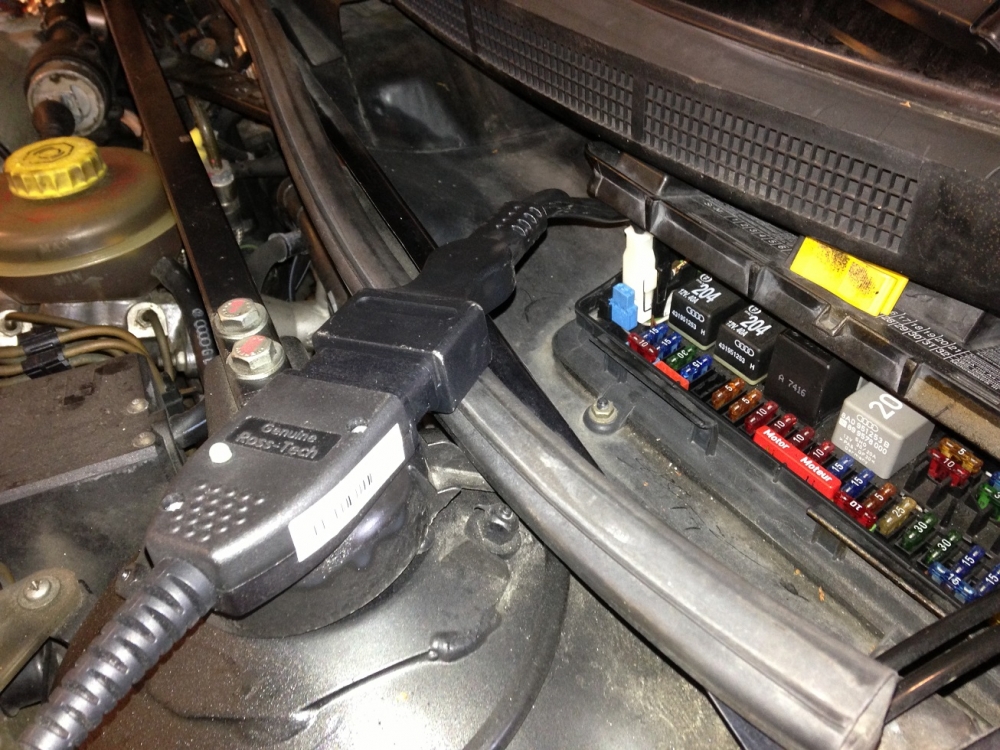
Photo courtesy of minim.Leave a comment:
-
When they have problems it's usually the driver for the com port part of the cable. Have a look in device manager and make sure it is showing as a com port and that vagcom is set to that com port number.Leave a comment:



Leave a comment: