VAG-COM on Windows 7

Collapse
X
 
  • Time
  • Show
Clear All
new posts
  • Sonic
    Administrator
    • Jul 2006
    • 5514
    • Home: United Kingdom Current: England

    #1

    VAG-COM on Windows 7

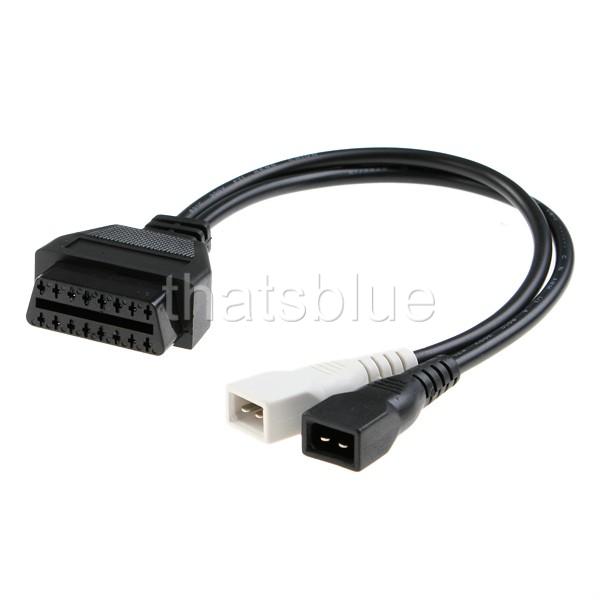
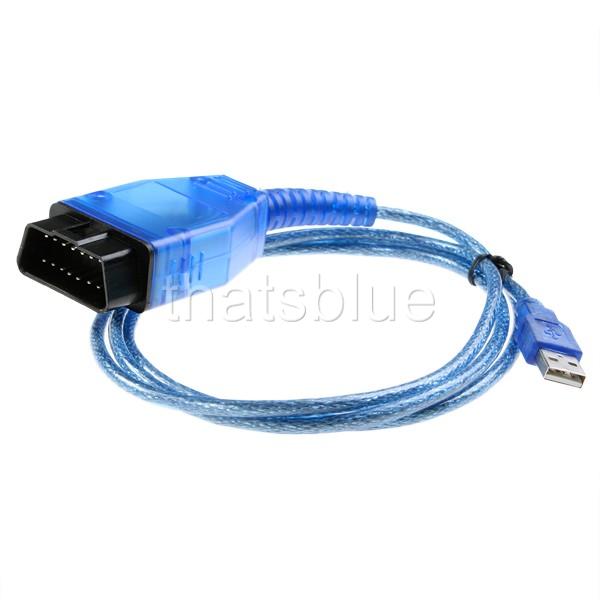
    I've got a cable to connect to the S2 along with a USB connector so that i can link the S2 up to my laptop via USB.

    Im running Windows 7, and whenever i try to run VagCom.exe it errors.

    Has anyone else had any luck? I've tried compatibility mode with Windows XP SP2.
    S2Forum.com Administrator
  • Nuvo
    S2Forum Possessed
    • Nov 2003
    • 3825

    #2
    What error message do you see and what version of VAG-COM are you using?
    Last edited by Nuvo; 9 February 2010, 19:12.

    Comment

    • Sonic
      Administrator
      • Jul 2006
      • 5514
      • Home: United Kingdom Current: England

      #3
      v409.1 installed to C:\Ross-Tech\VAG-COM and i'm getting VAG-COM has stopped working, check online for a solution or close the program.

      Problem signature:
      Problem Event Name: APPCRASH
      Application Name: VagCom.exe
      Application Version: 409.1.0.0
      Application Timestamp: 4193f827
      Fault Module Name: kernel32.dll
      Fault Module Version: 6.1.7600.16385
      Fault Module Timestamp: 4a5bdbde
      Exception Code: c0000005
      Exception Offset: 00039a07
      OS Version: 6.1.7600.2.0.0.256.48
      Locale ID: 2057
      Additional Information 1: 038b
      Additional Information 2: 038b113d0cf76a279e4cc3d66c6300c0
      Additional Information 3: 038b
      Additional Information 4: 038b113d0cf76a279e4cc3d66c6300c0

      Read our privacy statement online:


      If the online privacy statement is not available, please read our privacy statement offline:
      C:\Windows\system32\en-US\erofflps.txt
      S2Forum.com Administrator

      Comment

      • Nuvo
        S2Forum Possessed
        • Nov 2003
        • 3825

        #4
        409.1 *should* run okay when you are logged in as Admin and running XP SP2 compatibility although it isn't officially supported by RossTech. I've also read reports that the XP compatibilty add-on doesn't fix all known ills from legacy software.

        Attach the dump file for this fault and I'll take a quick look.

        This is an unhandled exception error which could be caused by any number of reasons. You would need to configure a JIT debug*er to catch the exception and analyse the code in this region to hopefully find the problem or some clues at least.

        Other alternatives to achieve compatibility are running a dual boot system with XP or running a VM of an XP install.
        Last edited by Nuvo; 9 February 2010, 21:40.

        Comment

        • rexr
          S2Forum Buff
          • Jan 2010
          • 36
          • Country: Norway

          #5
          I run vcds 908.1 on win 7 without any problems, with usercontrol turned off.

          Comment

          • Sonic
            Administrator
            • Jul 2006
            • 5514
            • Home: United Kingdom Current: England

            #6
            VCDS 9081 installs and runs, but will this work with the connector?
            S2Forum.com Administrator

            Comment

            • rexr
              S2Forum Buff
              • Jan 2010
              • 36
              • Country: Norway

              #7
              I guess this depends on your connector, I have the hex-usb, this works perfect on my rs2

              Check this link for determination of connector and program

              Comment

              • Sonic
                Administrator
                • Jul 2006
                • 5514
                • Home: United Kingdom Current: England

                #8
                Cheers, i've no idea what type im using.

                Its this:


                with this:


                Nuvo - the log above is the exception from running in xp sp2 compatability mode as administrator, do you want me to install a JIT de******? Im downloading the windows 7 xp mode thing now to give that ago.

                S2Forum.com Administrator

                Comment

                • rexr
                  S2Forum Buff
                  • Jan 2010
                  • 36
                  • Country: Norway

                  #9
                  this is the one i'm using original ross tech. Seems pretty much the same

                  IMG_2550.jpg IMG_2551.jpg

                  Comment

                  • Nuvo
                    S2Forum Possessed
                    • Nov 2003
                    • 3825

                    #10
                    Sonic, VCDS 9081 *won't* run with your cable. VCDS requires the HEX-USB adapter which acts as a dongle. Your cable is a simple USB to serial converter and will only work with VAG-COM 409.1 and below.

                    Try the XP add-on pack first and see how you go with that. Wow! I didn't realise this "add-on" is a 500MB image file plus you need to install Virtual PC. I smell overkill.

                    The above unhandled exception details wasn't copied from a .dmp file was it?

                    Do a file search for this and sort by date and time to find the most recent fault log.
                    You would need to download and install WinDbg for this task.

                    Run VAG-COM and WinDbg should break, type !analyze -v into the command line and you will generate the exception analysis. Copy and paste this or attach it as a file if it is a particularly large body of text.
                    Last edited by Nuvo; 9 February 2010, 22:28.

                    Comment

                    • Sonic
                      Administrator
                      • Jul 2006
                      • 5514
                      • Home: United Kingdom Current: England

                      #11
                      This is from the windows application event log, looks like the same info as before.

                      Im downloading the bulky windows xp file and the windows debugging tools. Will update when i have them


                      Log Name: Application
                      Source: Application Error
                      Date: 09/02/2010 22:33:01
                      Event ID: 1000
                      Task Category: (100)
                      Level: Error
                      Keywords: Classic
                      User: N/A
                      Computer: Andy-Laptop.home.local
                      Description:
                      Faulting application name: VagCom.exe, version: 409.1.0.0, time stamp: 0x4193f827
                      Faulting module name: kernel32.dll, version: 6.1.7600.16385, time stamp: 0x4a5bdbde
                      Exception code: 0xc0000005
                      Fault offset: 0x00039a07
                      Faulting process id: 0x1460
                      Faulting application start time: 0x01caa9d7d6760f86
                      Faulting application path: C:\Ross-Tech\VAG-COM\VagCom.exe
                      Faulting module path: C:\Windows\syswow64\kernel32.dll
                      Report Id: 1467a1b0-15cb-11df-ab7c-0016cfeed18c
                      Event Xml:
                      <Event xmlns="http://schemas.microsoft.com/win/2004/08/events/event">
                      <System>
                      <Provider Name="Application Error" />
                      <EventID Qualifiers="0">1000</EventID>
                      <Level>2</Level>
                      <Task>100</Task>
                      <Keywords>0x80000000000000</Keywords>
                      <TimeCreated SystemTime="2010-02-09T22:33:01.000000000Z" />
                      <EventRecordID>22158</EventRecordID>
                      <Channel>Application</Channel>
                      <Computer>Andy-Laptop.home.local</Computer>
                      <Security />
                      </System>
                      <EventData>
                      <Data>VagCom.exe</Data>
                      <Data>409.1.0.0</Data>
                      <Data>4193f827</Data>
                      <Data>kernel32.dll</Data>
                      <Data>6.1.7600.16385</Data>
                      <Data>4a5bdbde</Data>
                      <Data>c0000005</Data>
                      <Data>00039a07</Data>
                      <Data>1460</Data>
                      <Data>01caa9d7d6760f86</Data>
                      <Data>C:\Ross-Tech\VAG-COM\VagCom.exe</Data>
                      <Data>C:\Windows\syswow64\kernel32.dll</Data>
                      <Data>1467a1b0-15cb-11df-ab7c-0016cfeed18c</Data>
                      </EventData>
                      </Event>
                      S2Forum.com Administrator

                      Comment

                      • Sonic
                        Administrator
                        • Jul 2006
                        • 5514
                        • Home: United Kingdom Current: England

                        #12
                        CommandLine: "C:\Ross-Tech\VAG-COM\VagCom.exe"
                        Symbol search path is: *** Invalid ***
                        ************************************************** **************************
                        * Symbol loading may be unreliable without a symbol search path. *
                        * Use .symfix to have the de****** choose a symbol path. *
                        * After setting your symbol path, use .reload to refresh symbol locations. *
                        ************************************************** **************************
                        Executable search path is:
                        ModLoad: 00000000`00400000 00000000`00623000 image00000000`00400000
                        ModLoad: 00000000`77330000 00000000`774db000 ntdll.dll
                        ModLoad: 00000000`77510000 00000000`77690000 ntdll32.dll
                        ModLoad: 00000000`73bc0000 00000000`73bff000 C:\Windows\SYSTEM32\wow64.dll
                        ModLoad: 00000000`73b60000 00000000`73bbc000 C:\Windows\SYSTEM32\wow64win.dll
                        ModLoad: 00000000`73b50000 00000000`73b58000 C:\Windows\SYSTEM32\wow64cpu.dll
                        (de8.175c): Break instruction exception - code 80000003 (first chance)
                        *** ERROR: Symbol file could not be found. Defaulted to export symbols for ntdll.dll -
                        ntdll!CsrSetPriorityClass+0x40:
                        00000000`773e1220 cc int 3
                        0:000> !analyze -v
                        ************************************************** *****************************
                        * *
                        * Exception Analysis *
                        * *
                        ************************************************** *****************************

                        ***** OS symbols are WRONG. Please fix symbols to do analysis.

                        ************************************************** ***********************
                        *** ***
                        *** ***
                        *** Your de****** is not using the correct symbols ***
                        *** ***
                        *** In order for this command to work properly, your symbol path ***
                        *** must point to .pdb files that have full type information. ***
                        *** ***
                        *** Certain .pdb files (such as the public OS symbols) do not ***
                        *** contain the required information. Contact the group that ***
                        *** provided you with these symbols if you need this command to ***
                        *** work. ***
                        *** ***
                        *** Type referenced: ntdll!_PEB ***
                        *** ***
                        ************************************************** ***********************
                        *** ERROR: Module load completed but symbols could not be loaded for image00000000`00400000
                        *** ERROR: Symbol file could not be found. Defaulted to export symbols for C:\Windows\SYSTEM32\wow64cpu.dll -
                        *** ERROR: Symbol file could not be found. Defaulted to export symbols for C:\Windows\SYSTEM32\wow64win.dll -
                        *** ERROR: Symbol file could not be found. Defaulted to export symbols for C:\Windows\SYSTEM32\wow64.dll -
                        *** ERROR: Symbol file could not be found. Defaulted to export symbols for ntdll32.dll -
                        ************************************************** ***********************
                        *** ***
                        *** ***
                        *** Your de****** is not using the correct symbols ***
                        *** ***
                        *** In order for this command to work properly, your symbol path ***
                        *** must point to .pdb files that have full type information. ***
                        *** ***
                        *** Certain .pdb files (such as the public OS symbols) do not ***
                        *** contain the required information. Contact the group that ***
                        *** provided you with these symbols if you need this command to ***
                        *** work. ***
                        *** ***
                        *** Type referenced: IMAGE_NT_HEADERS32 ***
                        *** ***
                        ************************************************** ***********************
                        ************************************************** *******************
                        * Symbols can not be loaded because symbol path is not initialized. *
                        * *
                        * The Symbol Path can be set by: *
                        * using the _NT_SYMBOL_PATH environment variable. *
                        * using the -y <symbol_path> argument when starting the de******. *
                        * using .sympath and .sympath+ *
                        ************************************************** *******************
                        ************************************************** *******************
                        * Symbols can not be loaded because symbol path is not initialized. *
                        * *
                        * The Symbol Path can be set by: *
                        * using the _NT_SYMBOL_PATH environment variable. *
                        * using the -y <symbol_path> argument when starting the de******. *
                        * using .sympath and .sympath+ *
                        ************************************************** *******************

                        FAULTING_IP:
                        ntdll!CsrSetPriorityClass+40
                        00000000`773e1220 cc int 3

                        EXCEPTION_RECORD: ffffffffffffffff -- (.exr 0xffffffffffffffff)
                        ExceptionAddress: 00000000773e1220 (ntdll!CsrSetPriorityClass+0x0000000000000040)
                        ExceptionCode: 80000003 (Break instruction exception)
                        ExceptionFlags: 00000000
                        NumberParameters: 1
                        Parameter[0]: 0000000000000000

                        FAULTING_THREAD: 000000000000175c

                        DEFAULT_BUCKET_ID: WRONG_SYMBOLS

                        PROCESS_NAME: image00000000`00400000

                        ADDITIONAL_DEBUG_TEXT:
                        Use '!findthebuild' command to search for the target build information.
                        If the build information is available, run '!findthebuild -s ; .reload' to set symbol path and load symbols.

                        MODULE_NAME: ntdll

                        FAULTING_MODULE: 0000000077330000 ntdll

                        DEBUG_FLR_IMAGE_TIMESTAMP: 4a5be02b

                        ERROR_CODE: (NTSTATUS) 0x80000003 - {EXCEPTION} Breakpoint A breakpoint has been reached.

                        EXCEPTION_CODE: (HRESULT) 0x80000003 (2147483651) - One or more arguments are invalid

                        EXCEPTION_PARAMETER1: 0000000000000000

                        PRIMARY_PROBLEM_CLASS: WRONG_SYMBOLS

                        BUGCHECK_STR: APPLICATION_FAULT_WRONG_SYMBOLS

                        LAST_CONTROL_TRANSFER: from 000000007739183d to 00000000773e1220

                        STACK_TEXT:
                        00000000`0008f220 00000000`7739183d : 00000000`00323100 00000000`02889f78 00000000`7efdf000 00000000`00322b90 : ntdll!CsrSetPriorityClass+0x40
                        00000000`0008f260 00000000`77377623 : 00000000`00000000 00000000`77379181 00000000`77330000 00000000`00000000 : ntdll!LdrGetProcedureAddress+0x947d
                        00000000`0008f760 00000000`7736308e : 00000000`0008f820 00000000`00000000 00000000`7efdf000 00000000`00000000 : ntdll!RtlResetRtlTranslations+0xc63
                        00000000`0008f7d0 00000000`00000000 : 00000000`00000000 00000000`00000000 00000000`00000000 00000000`00000000 : ntdll!LdrInitializeThunk+0xe


                        FOLLOWUP_IP:
                        ntdll!CsrSetPriorityClass+40
                        00000000`773e1220 cc int 3

                        SYMBOL_STACK_INDEX: 0

                        SYMBOL_NAME: ntdll!CsrSetPriorityClass+40

                        FOLLOWUP_NAME: MachineOwner

                        IMAGE_NAME: ntdll.dll

                        STACK_COMMAND: ~0s ; kb

                        BUCKET_ID: WRONG_SYMBOLS

                        FAILURE_BUCKET_ID: WRONG_SYMBOLS_80000003_ntdll.dll!CsrSetPriorityCla ss

                        Followup: MachineOwner
                        ---------
                        S2Forum.com Administrator

                        Comment

                        • Nuvo
                          S2Forum Possessed
                          • Nov 2003
                          • 3825

                          #13
                          You'll need to download the OS symbol files and repeat the above steps. I'm sure you're aware of that.

                          Comment

                          • Sonic
                            Administrator
                            • Jul 2006
                            • 5514
                            • Home: United Kingdom Current: England

                            #14
                            Is this right or do i actually need the complete windows 7 symbol files download?

                            CommandLine: C:\Ross-Tech\VAG-COM\VagCom.exe
                            Symbol search path is: http://msdl.microsoft.com/download/symbols
                            Executable search path is:
                            ModLoad: 00000000`00400000 00000000`00623000 image00000000`00400000
                            ModLoad: 00000000`77330000 00000000`774db000 ntdll.dll
                            ModLoad: 00000000`77510000 00000000`77690000 ntdll32.dll
                            ModLoad: 00000000`73bc0000 00000000`73bff000 C:\Windows\SYSTEM32\wow64.dll
                            ModLoad: 00000000`73b60000 00000000`73bbc000 C:\Windows\SYSTEM32\wow64win.dll
                            ModLoad: 00000000`73b50000 00000000`73b58000 C:\Windows\SYSTEM32\wow64cpu.dll
                            (db4.eb0): Break instruction exception - code 80000003 (first chance)
                            ntdll!LdrpDoDe******Break+0x30:
                            00000000`773e1220 cc int 3
                            0:000> !analyze -v
                            ************************************************** *****************************
                            * *
                            * Exception Analysis *
                            * *
                            ************************************************** *****************************

                            *** ERROR: Module load completed but symbols could not be loaded for image00000000`00400000

                            FAULTING_IP:
                            ntdll!LdrpDoDe******Break+30
                            00000000`773e1220 cc int 3

                            EXCEPTION_RECORD: ffffffffffffffff -- (.exr 0xffffffffffffffff)
                            ExceptionAddress: 00000000773e1220 (ntdll!LdrpDoDe******Break+0x0000000000000030)
                            ExceptionCode: 80000003 (Break instruction exception)
                            ExceptionFlags: 00000000
                            NumberParameters: 1
                            Parameter[0]: 0000000000000000

                            FAULTING_THREAD: 0000000000000eb0

                            DEFAULT_BUCKET_ID: STATUS_BREAKPOINT

                            PROCESS_NAME: image00000000`00400000

                            ERROR_CODE: (NTSTATUS) 0x80000003 - {EXCEPTION} Breakpoint A breakpoint has been reached.

                            EXCEPTION_CODE: (HRESULT) 0x80000003 (2147483651) - One or more arguments are invalid

                            EXCEPTION_PARAMETER1: 0000000000000000

                            NTGLOBALFLAG: 70

                            APPLICATION_VERIFIER_FLAGS: 0

                            PRIMARY_PROBLEM_CLASS: STATUS_BREAKPOINT

                            BUGCHECK_STR: APPLICATION_FAULT_STATUS_BREAKPOINT

                            LAST_CONTROL_TRANSFER: from 000000007739183d to 00000000773e1220

                            STACK_TEXT:
                            00000000`0008f220 00000000`7739183d : 00000000`00303100 00000000`02889f78 00000000`7efdf000 00000000`00302b90 : ntdll!LdrpDoDe******Break+0x30
                            00000000`0008f260 00000000`77377623 : 00000000`00000000 00000000`77379181 00000000`77330000 00000000`00000000 : ntdll!LdrpInitializeProcess+0x17c7
                            00000000`0008f760 00000000`7736308e : 00000000`0008f820 00000000`00000000 00000000`7efdf000 00000000`00000000 : ntdll! ?? ::FNODOBFM::`string'+0x2bea0
                            00000000`0008f7d0 00000000`00000000 : 00000000`00000000 00000000`00000000 00000000`00000000 00000000`00000000 : ntdll!LdrInitializeThunk+0xe


                            FOLLOWUP_IP:
                            ntdll!LdrpDoDe******Break+30
                            00000000`773e1220 cc int 3

                            SYMBOL_STACK_INDEX: 0

                            SYMBOL_NAME: ntdll!LdrpDoDe******Break+30

                            FOLLOWUP_NAME: MachineOwner

                            MODULE_NAME: ntdll

                            IMAGE_NAME: ntdll.dll

                            DEBUG_FLR_IMAGE_TIMESTAMP: 4a5be02b

                            STACK_COMMAND: ~0s ; kb

                            FAILURE_BUCKET_ID: STATUS_BREAKPOINT_80000003_ntdll.dll!LdrpDoDe***** *Break

                            BUCKET_ID: X64_APPLICATION_FAULT_STATUS_BREAKPOINT_ntdll!Ldrp DoDe******Break+30

                            Followup: MachineOwner
                            ---------
                            S2Forum.com Administrator

                            Comment

                            • Sonic
                              Administrator
                              • Jul 2006
                              • 5514
                              • Home: United Kingdom Current: England

                              #15
                              Im never going to complain trying to debug a web application ever again
                              S2Forum.com Administrator

                              Comment

                              Working...