

Decided this was better off in its own thread. I know it took me forever to find this info and what I did find was bitty....
This means me dragging out all the source code and bits and bobs again. Given what a PITA it was to do I really should do it and maybe give it to S2Central
Schematics wont help you a lot TBH as that board has a shedload of other stuff on it.
You need to pick up (at the cluster, beleive its the YELLOW connector):
T14/8 - Enable, pulled high (+5) to take control of the display. Autocheck will override your display though.
T14/3 - Clock (+5) to clock in data
T14/4 - Data (+5) for display data
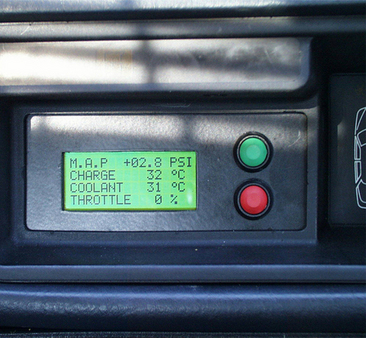
IIRC you need to send a whole display worth of data.#, 8 bits per character to start redrawing at the top again or drop 'enable' and start over. It takes 8 Bit ASCII and my code is a bit cludgy as it was made to work and never finessed. It may be possible to send control codes to do things but I've never had the luxury of having a dash not in a car to play with Timings were worked out by starting with fast clocks and comming down till it worked, then adding a wide error margin. That display is not fast at all. I have a PIC18F4550 (I think) doing it as it does a lot more but one of the simple, cheaper pics should be able to do it. PIC16F628a may be a good choice as its cheap and has a fast serial port and onboard oscillator. All you have to do in theory is take the RS232 data and squirt it out as serial, so an ISR for the USART is probobly all you need write. Of course that leaves a few analog/digital inputs to play with.
Ive long suspected a nicer way might be to break into the ribbon to the Autocheck LCD, then watch whats going on. Its an of fthe shelf LCD controller and so its not that hard to get info on and the ribbon is between that controller and the dash micro. Drive it yourself and do everything you want (lots of pretty GFX then) and let go when you see the micro on the dash select the display. You could if you felt brave/mad/both drop an old digi cam 1" colour tft in there and really muck about then. The final option is to map out the pins on the micro and simply rip it out and drop a new one in there, not that silly an idea as the tricky interfacing has been done by audi.
If someone donates a dash or if I find one on fleabay I will hapilly document things. The Audi connectors used on the dash are compatiable with standard IDC ribbon connectors/ BERG .250 headers if you need to break into them. Ive done this the other way round before and used Audi connectors to connect to VFD units.
Are there any other signals that people might like to pick up for their car PC? I pick up the illumination line to dim the TFT down as well as the tacho signals for speedo and tacho here. its possible to set a timer and count the pulses on these lines and you can let the PC work out what the real speed is based on that.
Originally Posted by Zoig View Post
Intput from Sensors and translated by PIC onto Autochek seems nearly perfect in my mind for now.
Ii there a possibility to use this interface as a shiftlight, gear indicator, G-meter, EGT/IAT etc?
Could you share more details on the bridge? Like schematics on how to build it or where to buy it.
PC input would be next step if I finally get so far, that I could figure out what and how exactly to install into the car
Intput from Sensors and translated by PIC onto Autochek seems nearly perfect in my mind for now.
Ii there a possibility to use this interface as a shiftlight, gear indicator, G-meter, EGT/IAT etc?
Could you share more details on the bridge? Like schematics on how to build it or where to buy it.
PC input would be next step if I finally get so far, that I could figure out what and how exactly to install into the car
Schematics wont help you a lot TBH as that board has a shedload of other stuff on it.
You need to pick up (at the cluster, beleive its the YELLOW connector):
T14/8 - Enable, pulled high (+5) to take control of the display. Autocheck will override your display though.
T14/3 - Clock (+5) to clock in data
T14/4 - Data (+5) for display data
IIRC you need to send a whole display worth of data.#, 8 bits per character to start redrawing at the top again or drop 'enable' and start over. It takes 8 Bit ASCII and my code is a bit cludgy as it was made to work and never finessed. It may be possible to send control codes to do things but I've never had the luxury of having a dash not in a car to play with Timings were worked out by starting with fast clocks and comming down till it worked, then adding a wide error margin. That display is not fast at all. I have a PIC18F4550 (I think) doing it as it does a lot more but one of the simple, cheaper pics should be able to do it. PIC16F628a may be a good choice as its cheap and has a fast serial port and onboard oscillator. All you have to do in theory is take the RS232 data and squirt it out as serial, so an ISR for the USART is probobly all you need write. Of course that leaves a few analog/digital inputs to play with.
Ive long suspected a nicer way might be to break into the ribbon to the Autocheck LCD, then watch whats going on. Its an of fthe shelf LCD controller and so its not that hard to get info on and the ribbon is between that controller and the dash micro. Drive it yourself and do everything you want (lots of pretty GFX then) and let go when you see the micro on the dash select the display. You could if you felt brave/mad/both drop an old digi cam 1" colour tft in there and really muck about then. The final option is to map out the pins on the micro and simply rip it out and drop a new one in there, not that silly an idea as the tricky interfacing has been done by audi.
If someone donates a dash or if I find one on fleabay I will hapilly document things. The Audi connectors used on the dash are compatiable with standard IDC ribbon connectors/ BERG .250 headers if you need to break into them. Ive done this the other way round before and used Audi connectors to connect to VFD units.
Are there any other signals that people might like to pick up for their car PC? I pick up the illumination line to dim the TFT down as well as the tacho signals for speedo and tacho here. its possible to set a timer and count the pulses on these lines and you can let the PC work out what the real speed is based on that.



 (except a towball)


Comment